At the same quality (VMAF), NVENC’s H.264 and H.265 files were only −2% to +5% larger than the CPU encoders’ on live action and 7–18% larger on animation. For AV1 the gap is wide. Use NVENC when you are in a hurry and the CPU encoders when size matters most.
h264_nvencfiles were 2–5% larger than CPUlibx264(-preset medium) on live action and 11–18% larger on animation. It ran about 2.8× as fast at p4 and 1.8× at p7.hevc_nvencagainstlibx265was −2% to +4% on live action and 7–14% on animation, at 2.5–6× the speed.- Only
av1_nvencshowed a clear gap: 7–24% larger than SVT-AV1 (preset 8) on live action and 40–72% larger on animation.
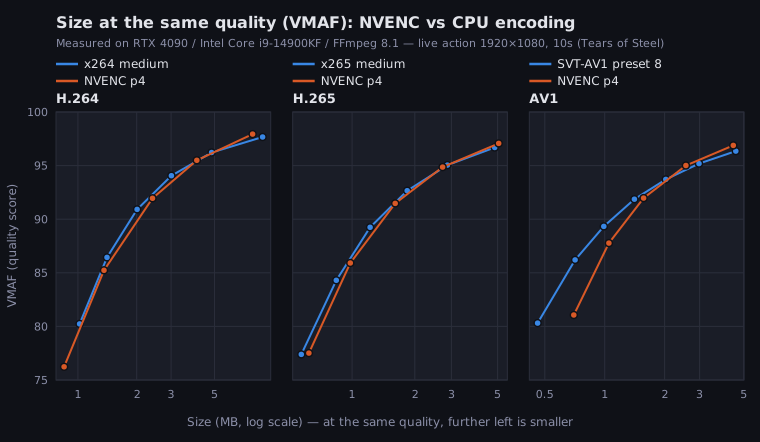
Size at the Same Quality
How much larger the NVENC file was than the CPU encoder for the same codec.
| NVENC setting | Compared with | Live action | Animation |
|---|---|---|---|
h264_nvenc p4 |
libx264 medium |
+3% to +5% | +11% to +18% |
h264_nvenc p7 |
libx264 medium |
+2% to +3% | +12% |
hevc_nvenc p4 |
libx265 medium |
+1% to +4% | +12% to +14% |
hevc_nvenc p7 |
libx265 medium |
−2% to +1% | +7% to +9% |
av1_nvenc p4 |
SVT-AV1 preset 8 | +9% to +24% | +45% to +72% |
av1_nvenc p7 |
SVT-AV1 preset 8 | +7% to +22% | +40% to +69% |
Speed
| Encoder and setting | Quality setting | Speed (fps) | Against the CPU encoder for the same codec |
|---|---|---|---|
libx264 medium |
CRF 24 | 156 | — |
h264_nvenc p4 |
CQ 31 | 434 | 2.8× |
h264_nvenc p7 |
CQ 31 | 279 | 1.8× |
libx265 medium |
CRF 26 | 66 | — |
hevc_nvenc p4 |
CQ 33 | 417 | 6.3× |
hevc_nvenc p7 |
CQ 33 | 166 | 2.5× |
| SVT-AV1 preset 8 | CRF 40 | 161 | — |
av1_nvenc p4 |
CQ 40 | 440 | 2.7× |
av1_nvenc p7 |
CQ 40 | 301 | 1.9× |
Speed was timed at one setting each, not at equal quality.
p4 vs p7
The default is p4. p7 is 1.5–2.5× slower than p4, and at the same quality its files are only 2–6% smaller for H.265 (about the same for H.264 and AV1).
Matching CQ to CRF
Settings that give the same VMAF (about 93), interpolated from the two nearest measured settings and rounded:
| Encoder | Live action | Animation |
|---|---|---|
libx264 medium (CRF) |
25 | 23 |
h264_nvenc p4 (CQ) |
30 | 26 |
libx265 medium (CRF) |
26 | 25 |
hevc_nvenc p4 (CQ) |
31 | 28 |
| SVT-AV1 preset 8 (CRF) | 36 | 39 |
av1_nvenc p4 (CQ) |
38 | 34 |
Setting -cq 23 out of CRF 23 habit gives a needlessly large file.
Which to Use
- You need H.264 that plays everywhere, and you are in a hurry:
h264_nvenc(p4). About 2.8× faster, and on live action only a few percent larger. - The recipient can play H.265:
hevc_nvenc(p7). About as fast aslibx264(166 vs 156 fps), with files about 20–30% smaller at the same quality. - Smallest file, and you can spend the time: SVT-AV1 (preset 4–6). Sizes and speeds per SVT-AV1 preset are in the AV1 encoding article.
- AV1 in a hurry:
av1_nvencis fast (440 fps) but larger than SVT-AV1 preset 8 (161 fps).
Commands
These use the live-action values from the table above (about VMAF 93).
# H.264 (CPU)
ffmpeg -i input.mp4 -c:v libx264 -preset medium -crf 25 -c:a copy output_x264.mp4

# H.265 (CPU)
ffmpeg -i input.mp4 -c:v libx265 -preset medium -crf 26 -tag:v hvc1 -c:a copy output_x265.mp4
For NVENC, -rc vbr -cq N -b:v 0 controls quality (CQ) instead of a set bitrate.
# H.264 (NVENC)
ffmpeg -i input.mp4 -c:v h264_nvenc -preset p4 -tune hq -rc vbr -cq 30 -b:v 0 -c:a copy output_nvenc.mp4

# H.265 (NVENC). Add -tag:v hvc1 if Apple devices will open it
ffmpeg -i input.mp4 -c:v hevc_nvenc -preset p7 -tune hq -rc vbr -cq 31 -b:v 0 -tag:v hvc1 -c:a copy output_hevc_nvenc.mp4

# AV1 (NVENC, RTX 40 series and later)
ffmpeg -i input.mp4 -c:v av1_nvenc -preset p4 -tune hq -rc vbr -cq 38 -b:v 0 -c:a copy output_av1_nvenc.mp4
For basic use and error fixes, see the NVENC article.
Compare on Your Own Footage
This prints the VMAF of an encoded file against the original (needs FFmpeg with libvmaf):
ffmpeg -i output.mp4 -i input.mp4 -lavfi "[0:v]setpts=PTS-STARTPTS[d];[1:v]setpts=PTS-STARTPTS[r];[d][r]libvmaf" -f null -Try 2–3 settings and compare the sizes of files that score about the same.
Measured on an RTX 4090, Core i9-14900KF and FFmpeg 8.1 (gyan.dev full build) on 2026-10-07. Sources: 10 seconds each of Tears of Steel (live action, 24 fps) and Big Buck Bunny (CG animation, 30 fps) at 1080p (© Blender Foundation, CC BY 3.0). Each encoder ran at 5–7 quality settings; sizes were compared at equal VMAF (libvmaf default model) by log-size interpolation, VMAF 84–94, video only. Speed is the median of 3 runs on 60 seconds of the live-action clip. Other GPU generations and other footage can give different results. NVENC used -tune hq -rc vbr with every other option at its default; the CPU encoders only at medium / preset 8. Speed includes CPU decoding of the input. Near VMAF 95 the gap narrows, and on live-action AV1 some NVENC points are smaller. Measurements are on the data page.