An MP4 can fail to play on Windows because of the video format inside it. Load the video into the playback fixer and it shows which part (video or audio) is the cause and how it will be fixed, then re-makes it as an MP4 that plays on almost any PC. Your video is processed in your browser and never uploaded.
Results by format
| Video | Windows (built-in apps) | Edge |
|---|---|---|
| Ordinary MP4 (H.264) | Yes | Yes |
| 10-bit or 4:4:4 H.264 | No | Yes |
| H.265 (HEVC) | Needs the extension | Needs the extension |
| AV1, VP9 | Yes* | Yes |
| AVI (MPEG-4) | Yes | No |
| ProRes MOV | No | Sound only |
* Result on a PC with the Microsoft Store extensions installed. The HEVC extension is “HEVC Video Extensions”.
The tool’s analysis of a 10-bit MP4:
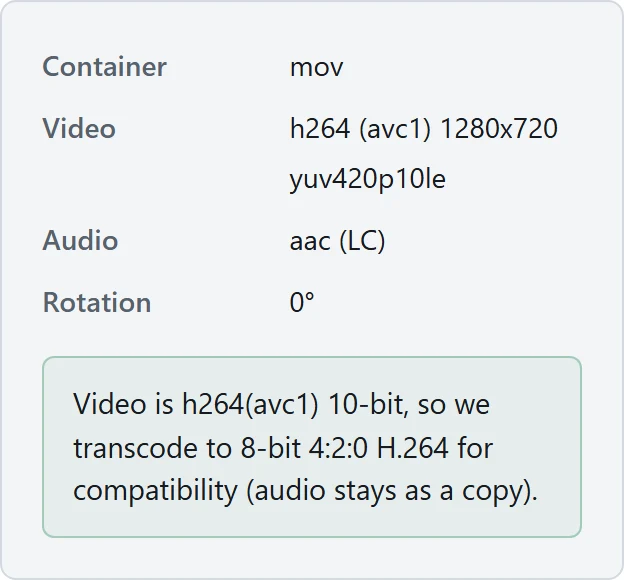
The 10-bit, 4:4:4 and ProRes clips that failed on Windows all played after re-making them with the tool’s settings.
No sound
- AC-3 (Dolby) audio plays silently in the built-in apps on some PCs since Windows 11 version 24H2 (Microsoft docs). The playback fixer converts the audio to AAC.
- If other videos play with sound, this video’s audio is the cause.
- To see whether the video has audio at all, load it into the playback fixer and check the “Audio” row.
iPhone videos
With its default setting, an iPhone records H.265 (HEVC). See iPhone Video Won’t Play on Windows? for what to check.
Checked on Windows 11 (with the HEVC, AV1 and VP9 extensions) with the playback system Windows’ built-in apps use (Media Foundation) and Edge 154, using 18 clips that differ only in format (2026-10-09). Results are on the data page.